Virtual Staging for Real Estate Listings
Virtual staging turns empty rooms into buyer-ready listing photos in under 60 seconds. Here's how it works, when to use it, and why 46% of agents have already added it to their listing workflow.
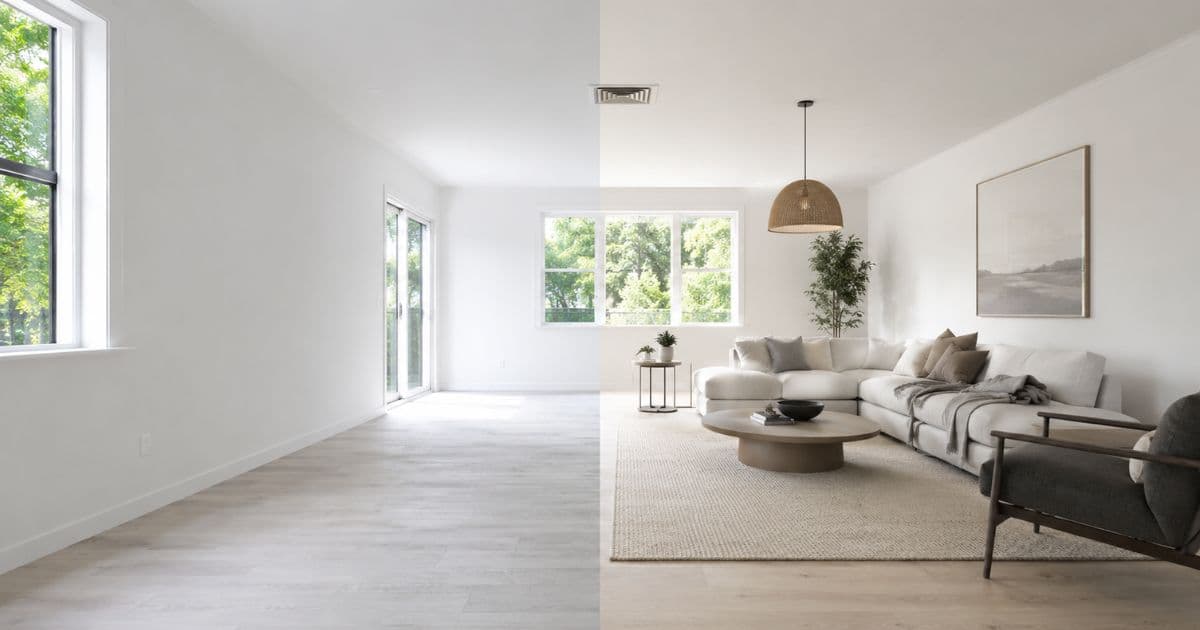
Staged listings sell 73% faster and for up to 10% more than unstaged equivalents (NAR, 2024). Virtual staging delivers that outcome for listing photos at a fraction of the cost and time of physical staging — and 46% of Realtors now use AI-generated visuals in their daily workflow (NAR, 2026).
This is a complete guide to virtual staging for real estate: how the technology works, when to use it, how to get the best results, and what it costs compared to every alternative.
What Virtual Staging Actually Is
Not all virtual staging is the same. The technology gap between manual Photoshop work and modern AI is significant — and it shows in the output.
Virtual staging is the process of digitally adding photorealistic furniture, décor, and styling to a room photo. Traditional virtual staging required a human graphic designer to manually place furniture assets — a process that took 24–48 hours and cost $15–$30 per image.
AI virtual staging automates that entirely. Homai's AI analyses the room's perspective, geometry, and natural light from a single photograph — then places furniture at accurate scale, angle, and shadow matching to the room's specific conditions.
The result is a fully furnished, listing-ready photo in under 60 seconds. Not a template applied to a generic room. Your actual room, furnished.
The key distinction that matters for real estate: Homai's AI is non-destructive. Walls, floors, ceilings, windows, and permanent architectural features are always preserved exactly as they appear in the source photo. Only furniture and décor are added. Every staged image accurately represents the physical property.
This is what separates a professional virtual staging tool from a generic AI image generator — and it's what prevents the compliance problems that arise when staged photos don't match the property at inspection.
Why Virtual Staging Works: The Buyer Psychology
Buyers don't buy properties. They buy futures they can picture themselves in.
Empty rooms present a cognitive challenge buyers don't always recognise. To form an emotional connection with an empty space, a buyer must simultaneously: mentally place furniture, assess whether their pieces will fit, imagine the room functioning as a home, and picture themselves in it — all from a single photograph.
Most buyers can't do this reliably. The empty room stays abstract. The connection doesn't form. They move on.
A staged room does that work for them. It demonstrates the room's function, establishes scale, creates warmth, and gives buyers the emotional anchor they need to picture their life there.
| Metric | Impact of Staging | Source |
|---|---|---|
| Days on market | 73% fewer for staged listings | NAR, 2024 |
| Sale price | Up to 10% higher | NAR, 2024 |
| Buyer agent perception | 82% say staging helps buyers visualise | NAR, 2024 |
| Click-through rate | Significantly higher for staged listing photos | Redfin, 2024 |
The agent takeaway: An unstaged listing photo isn't a neutral image — it's a harder sell, a longer time on market, and a lower final offer. At $0.60–$1.23 per room with Homai, there's no budget argument for leaving a room empty in listing photos.
How Homai's Virtual Staging Works
Three steps. Under 60 seconds. Listing-ready output.
Step 1: Upload a room photo Any JPG, PNG, or WEBP of an empty or lightly furnished room. Your existing listing photos work perfectly. Smartphone photos are acceptable — better-quality source photos produce better output.
Step 2: Choose room type and staging style Tell the AI what the room is — living room, bedroom, kitchen, dining room, home office — so it furnishes with appropriate pieces. Then select from 37+ curated design presets: Modern, Hamptons, Japandi, Coastal, Luxury, Industrial, Farmhouse, Art Deco, Scandinavian, and more.
Step 3: Download in under 60 seconds High-resolution output ready for portal upload, brochures, print, and social media. Multiple variations per generation so you can compare different furniture layouts and compositions before choosing the best image.
For full listings, use Batch mode — upload all room photos at once. Homai stages them in parallel and delivers all results in 2–3 minutes, alongside AI-generated marketing copy (portal description, headline, social post).
When Virtual Staging Delivers the Strongest Results
Staging works on most properties — but these scenarios produce the most dramatic improvement.
Vacant Properties
The primary use case. Empty homes are the hardest listings to convert online. Buyers scroll past rooms that give them nothing to connect with. Virtual staging transforms every vacant room into an emotionally engaging image before the listing goes live.
Properties with Dated or Mismatched Furniture
Homai's Remove & Replace Furniture tool removes existing furniture from a photo and restages with AI-generated pieces — without physically removing a single item from the property. Ideal for occupied homes where the existing furniture undermines the listing presentation.
New Builds and Pre-Completion Developments
AI staging can be applied to renders, architectural photography, or early construction photos to show buyers what finished furnished spaces will look like — before a stick of real furniture exists.
Investment Properties and Deceased Estates
Properties that have been vacant or unimproved for years present poorly in listing photos. Virtual staging closes the gap between what a property currently looks like and what a buyer needs to see to make a confident decision.
Tight Campaign Timelines
When a listing needs to go live before a physical staging crew can be scheduled, virtual staging delivers listing-quality photos the same day.
Matching Style to Buyer Profile
The most effective staging style isn't the most popular — it's the one that resonates with the most likely buyer for that specific property.
| Property / Buyer Type | Best Staging Styles |
|---|---|
| Family home buyers | Hamptons, Farmhouse, Coastal |
| Young professionals / apartments | Modern, Japandi, Industrial |
| Luxury / prestige buyers | Luxury, Art Deco, Hamptons |
| Airbnb / short-term rental | Coastal, Japandi, Scandinavian |
| Regional / lifestyle properties | Farmhouse, Coastal, Warm Contemporary |
| Investment / downsizer buyers | Modern, Scandinavian, Japandi |
Generate 2–3 styles for the key rooms (living room, master bedroom) and compare them directly before uploading to portals. What reads as premium in one suburb may read as cold in another.
Getting the Best Results
Input quality directly affects output quality. These five things make a consistent difference.
Shoot with good natural light. Natural light produces the most realistic furniture placement. Rooms photographed in low light or under mixed artificial lighting produce less natural-looking staging.
Use level horizons. Photos taken at a steep angle or with a tilted camera make perspective calculations harder for the AI. Shoot straight-on from chest height where possible.
Prefer empty rooms. Less clutter helps the AI place furniture cleanly. For occupied properties, clearing benchtops, removing bulky items, and tidying before photographing makes a material difference.
Generate multiple variations. Different furniture layouts and compositions emerge across variations. Always generate at least 2–4 versions of the living room and master bedroom — the key rooms that drive buyer decisions.
Use batch mode for full listings. Staging rooms individually misses the consistency benefit. A consistent staging style across all rooms makes the listing feel cohesive — which increases buyer confidence.
Virtual Staging vs Physical Staging
The right choice depends on how buyers engage with the property — online, at inspection, or both.
| Physical Staging | Homai Virtual Staging | |
|---|---|---|
| Cost per room | $400–$1,000 | From ~$0.67 |
| Turnaround | 3–5 days | Under 60 seconds |
| Listing photo outcome | High | Comparable |
| Open inspection experience | Furniture physically present | Empty rooms at inspection |
| Suitable for tight timelines | No | Yes |
| Batch processing | Impossible | Entire listing in minutes |
For most listings: virtual staging for portal photos, combined with decluttering and a few well-placed physical accessories for open inspections. For premium listings with high foot-traffic open homes, physical staging for inspection days remains valuable — combined with virtual staging for the initial portal launch.
Disclosure Requirements
AI-staged images should be disclosed as virtual or digitally staged in all advertising. Requirements vary by region and listing portal — always follow your agency compliance process and portal-specific rules.
Homai includes a disclosure reminder on every staged result, and AI disclosure metadata is embedded automatically in every processed image.
Frequently Asked Questions
How realistic is AI virtual staging?
Homai produces photorealistic results that preserve your room's actual architecture. Buyers browsing listing portals at standard viewing sizes cannot distinguish AI-staged photos from physically staged ones.
Can I stage rooms that already have furniture?
Yes. Homai's Remove & Replace Furniture tool removes existing furniture from a room photo and restages with AI-generated pieces — without any physical work on site.
What room types does Homai stage?
All residential room types: living rooms, bedrooms, kitchens, dining areas, home offices, open-plan spaces, bathrooms, and outdoor areas.
How many staging styles are available?
37+ curated presets built specifically for residential listing presentation.
What resolution does Homai produce?
4K at 4096×2731 — print-ready for brochures, signboards, and all digital uses.
How much does virtual staging cost with Homai?
From ~$0.67 per room on the Starter plan and as low as $0.60 on the Pro plan. See the virtual staging pricing guide for a full breakdown.
Does Homai include marketing copy?
Yes — every batch job generates a portal listing description, listing headline, and social media post alongside the staged images.
Turn Every Empty Room Into a Buyer-Ready Listing Photo
Upload a room photo. Choose a style. Download a listing-ready staged image in under 60 seconds. Free to start — no credit card required.
Start virtual staging free → homaihq.com
Related: AI Virtual Staging for Agents | House Staging Service | Virtual Staging Pricing
Written by Homai
AI staging and interior design for real estate agents
Related articles
AI Virtual Staging for Real Estate Agents
How AI virtual staging works and how to integrate it into your listing production workflow.
House Staging Service
AI house staging service — listing-ready photos in 60 seconds without furniture hire.
Virtual Staging Pricing Guide
Per-image vs subscription pricing — how to compare plans for your listing volume.
Try Homai
Start staging your next listing
Upload one room photo and download a listing-ready staged image in under 60 seconds. Free staging on signup — no credit card required.