AI Virtual Staging Built for Real Estate Agents
AI virtual staging built for real estate listing workflows. Generate realistic staged photos, multiple variations, and listing-ready assets in minutes — designed around how agents actually work.
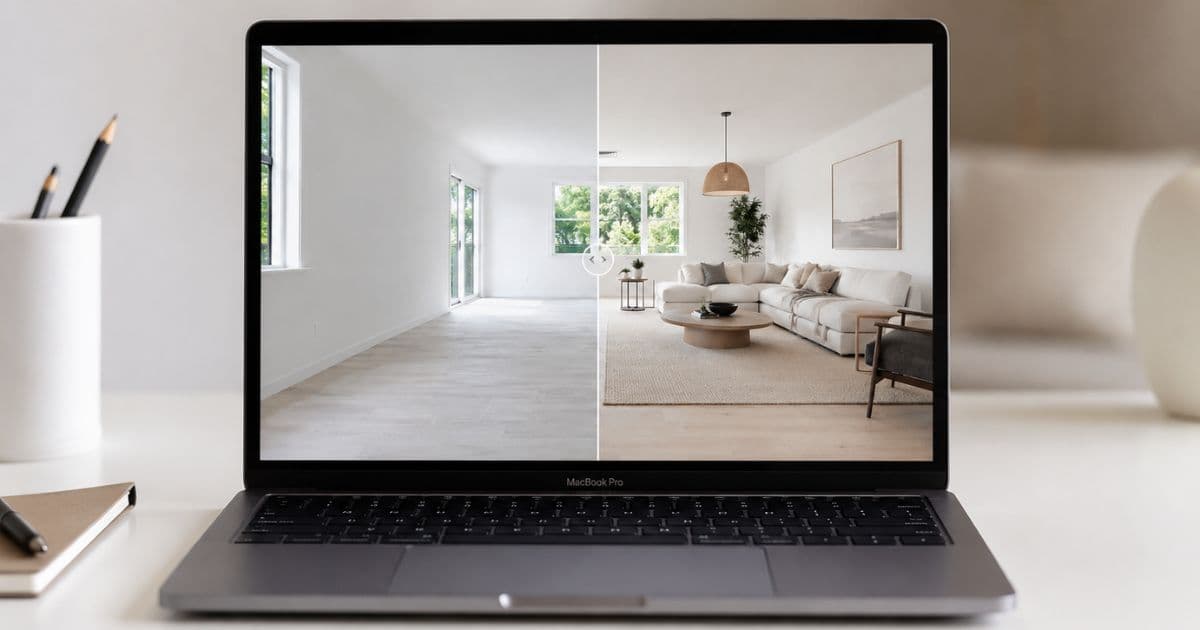
46% of Realtors now use AI-generated visuals in their daily workflow (NAR, 2026). The agents who haven't made the shift aren't saving money — they're competing with listing photos that perform worse than their colleagues', on every metric that matters: views, click-throughs, enquiries, and days on market.
Homai is listing production software built specifically for real estate. Not a generic image tool adapted for agents — a platform designed around the constraints agents actually work with: fast turnaround, consistent output, portal-ready results, and a workflow that fits inside a campaign timeline.
Why AI Staging Changes the Listing Conversation
Agents who show vendors a staged version of their property during the listing appraisal — before a competitor gets through the door — have a concrete advantage.
Most vendors don't know what their property could look like with professional staging. They've been living in it. They see the existing furniture, the wear, the familiarity. An agent who shows them a photorealistic AI-staged version of their own property — in Hamptons, in Modern, in Coastal — in the listing appraisal shifts the entire conversation.
The vendor sees the potential. The agent demonstrates professional capability before the listing is even signed. Competitors who show up with a price and a brochure template are competing on a different level.
Beyond the listing appraisal, the staged photos deliver:
- More listing views — staged listings generate significantly higher portal click-through rates
- Faster sales — staged homes sell 73% fewer days on market (NAR, 2024)
- Higher prices — staged homes achieve up to 10% more (NAR, 2024)
- More enquiries — buyers emotionally connect with staged rooms, empty rooms they don't
What Makes Homai Different from Generic AI Tools
Most AI tools that appear in "virtual staging" searches weren't built for real estate. The design priorities are wrong.
Generic AI image generators trained on broad visual data produce interesting results — but they're calibrated for creative output, not listing photography. They regularly alter walls, change flooring, modify window sizes, or adjust ceiling heights when staging.
These are permanent fixtures. A listing photo that doesn't match the physical property creates trust problems at inspection. In some markets, it creates legal exposure.
Homai's non-destructive guarantee: permanent architecture is always preserved. Walls, floors, ceilings, windows, and structural features are never changed. Only furniture and décor are added. Every staged image accurately represents the physical property.
Other differentiators built specifically for agent workflows:
- ~45 seconds per image — ready before the photographer leaves the site
- 37+ curated staging presets — calibrated for residential listing performance, not generic aesthetics
- Batch mode — stage an entire property simultaneously, all rooms in parallel
- AI marketing copy — portal description, headline, and social post generated alongside staged images
- Multiple variations per room — compare layouts and compositions before choosing
- Disclosure auto-embedded — compliant on all major portals without manual labelling
- 4K output — print-ready for brochures, signboards, and large-format displays
Best Practices for Great AI Staging Results
Three principles that consistently improve output quality.
Shoot Straight-On with Good Natural Light
Level horizons and natural light produce the most realistic furniture placement.
Natural light gives the AI accurate information about shadow direction, surface reflectivity, and room depth. Photos shot in low light or under mixed artificial lighting produce less natural-looking results.
Shoot rooms in the morning with blinds open where possible. Set the camera or smartphone to chest height and shoot straight-on rather than from a corner angle.
Start with an Empty Room
Less clutter helps the AI place furniture cleanly and avoid perspective conflicts with existing items.
For vacant properties this is straightforward. For occupied properties, removing bulky furniture, clearing benchtops, and tidying before photographing makes a material difference to output quality.
Homai's Remove & Replace Furniture tool handles occupied properties where clearing isn't possible — it removes existing furniture from the photo first, then stages with AI-generated pieces.
Generate Multiple Variations and Compare
Different layouts and compositions emerge across variations — always pick from several.
Key rooms like the living room and master bedroom benefit most from generating 3–4 variations. Different furniture arrangements, different rug positions, different accessory placements — compare them against each other before uploading to portals.
One variation is a guess. Four variations is a choice.
Matching Staging Style to Buyer Profile
The most effective style isn't the agent's preference — it's the one that resonates with the most likely buyer.
| Target Buyer | Best Staging Styles |
|---|---|
| Family buyers | Hamptons, Farmhouse, Coastal |
| Young professionals | Modern, Japandi, Industrial |
| Luxury / prestige | Luxury, Art Deco, Hamptons |
| Airbnb / investors | Coastal, Japandi, Scandinavian |
| Regional / lifestyle | Farmhouse, Warm Contemporary |
| Design-conscious / downsizers | Japandi, Minimalist, Scandinavian |
Generate 2–3 styles for the living room and master bedroom and compare them directly. What reads as premium in one suburb reads as cold in another. The preview is free — use it.
The Full Homai Workflow for a Complete Listing
From empty property to published listing package — under 30 minutes.
1. Photograph the property Standard real estate photography or smartphone. JPG, PNG, or WEBP.
2. Upload to Homai batch job Upload all room photos at once. Select a consistent staging style for the entire property.
3. Generate Homai stages all rooms in parallel — ~45 seconds per room. A 5-room property is fully staged in under 5 minutes.
4. Download the complete package
- All rooms staged at 4K resolution
- Portal listing description
- Listing headline
- Social media post
- AI disclosure metadata embedded on every image
5. Publish Upload directly to listing portals, brochures, signboards, and social. Everything is ready — no editing, no post-processing, no additional tools.
The agent takeaway: The entire workflow from empty rooms to complete publishable listing package — staged photos, description, headline, social post — takes under 30 minutes. That's the same time the old process took just to send photos to an outsourcing service.
AI Staging for Different Listing Scenarios
Vacant Properties
The primary use case. Every empty room staged, consistent style across the entire listing, complete marketing package ready the same day photography is done.
Occupied Properties with Dated Furniture
Remove & Replace Furniture tool removes existing pieces and restages — no physical disruption, no scheduling, no waiting. The listing photos look like a freshly staged vacant property.
Vendor Presentations
Generate a staged version of the vendor's property before the listing appraisal. Show them exactly what their home could look like in Hamptons, in Modern, in Coastal. Competitors who show up without this are competing on a different level.
Pre-Market and Off-Plan
AI staging can be applied to renders, early construction photos, or architectural drawings — showing buyers what finished furnished spaces will look like before the property is complete.
What's Included in Every Homai Plan
- 37+ listing-ready staging styles — curated design presets
- Multiple variations per room
- Batch staging for multi-room listings
- All room types — kitchen, bedroom, living room, dining area, home office
- 4K high-resolution download (4096×2731)
- AI marketing copy with batch jobs
- Disclosure reminder and embedded metadata on every result
Pricing
Homai uses subscription plans designed for listing production volume. Plans start at $49/month for 80 credits — at 2 credits per staging, that's 40 staged rooms per month at $1.23 per room at entry level and as low as $0.67 per room on the Pro plan.
Compare this to:
- Physical staging: $400–$1,000 per room
- Manual outsourcing: $15–$30 per image
- Homai: from $0.67 per room
See the virtual staging pricing guide for the full breakdown.
Frequently Asked Questions
How fast does Homai produce staged images?
~45 seconds per image. A 5-room batch job completes in under 5 minutes.
Is non-destructive staging guaranteed?
Yes — Homai's AI preserves all permanent architectural features on every output. Walls, floors, ceilings, windows are never changed.
Can I stage properties that have existing furniture?
Yes — the Remove & Replace Furniture tool removes existing pieces and restages with AI-generated furnishings. No physical work required.
What output resolution does Homai produce?
4K at 4096×2731 — print-ready for brochures, signboards, and all digital uses.
Does Homai include AI marketing copy?
Yes — every batch job generates portal description, headline, and social media post alongside the staged images.
How does Homai handle disclosure?
AI disclosure metadata is auto-embedded on every processed image, and a disclosure reminder appears on every staged result. No manual labelling required.
Listing-Ready AI Staging in Under 60 Seconds
Upload a room photo. Choose a style. Download a staged result you can publish today. Free to start — no credit card required.
Start staging free → homaihq.com
Related: Virtual Staging for Real Estate | House Staging Service | Real Estate Virtual Staging
Written by Homai
AI staging and interior design for real estate agents
Related articles
Virtual Staging for Real Estate
A practical guide to virtual staging for agents and fast campaign timelines.
House Staging Service
AI house staging service — listing-ready photos in 60 seconds without furniture hire.
Real Estate Virtual Staging
What virtual staging is, how it compares to physical staging, and when to use it.
Try Homai
Generate your first AI-staged listing photo
Upload one room photo and get a listing-ready staged image in under 60 seconds. Free staging on signup — no credit card required.