House Staging Service: The Complete Guide to AI Virtual Staging in 2026
Everything real estate agents and home sellers need to know about house staging — why it works, traditional vs AI virtual staging costs, and how Homai stages a listing in under 60 seconds for ~$0.60 per image.
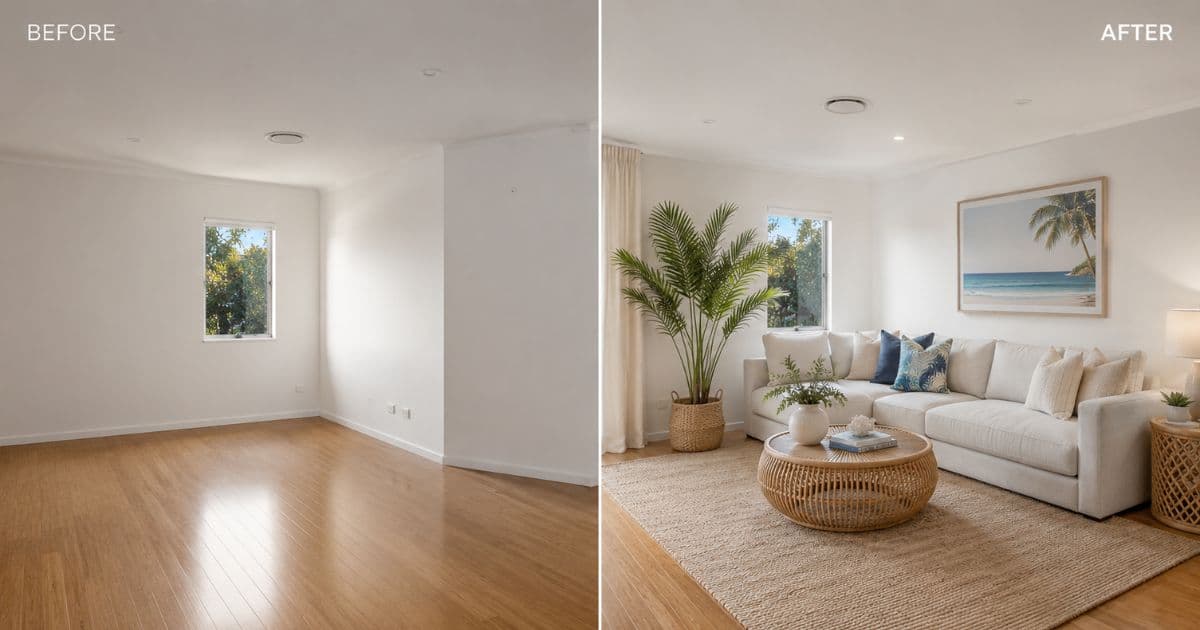
When a property sits empty, buyers don't see potential. They see an empty box. They can't assess scale, can't imagine furniture fitting, and form no emotional connection with the space. Most of them scroll past.
When it's staged — physically or virtually — they see a life they could be living there. That difference is worth 73% faster sales and 10% higher prices (NAR, 2024).
In 2025, the question is no longer whether to stage. It's whether spending $3,000–$8,000 on physical furniture for listing photos still makes sense when AI virtual staging delivers comparable results for $0.60 per image.
What a House Staging Service Actually Does
Staging is buyer psychology applied to physical space. The goal isn't a beautiful room — it's an emotional response in strangers who've never been there before.
A house staging service furnishes and styles a property for sale. Everything about it is oriented toward one outcome: buyers who have never seen the home before feel emotionally connected to it within seconds of viewing the listing photos.
Buyers don't buy properties. They buy futures they can picture themselves in.
Two forms of staging exist in 2025:
Physical staging — a crew brings real furniture into the property. Effective. Expensive. Logistically complex. $3,000–$8,000+ per property, plus $800–$2,500/month in continuation fees.
AI virtual staging — software adds photorealistic furniture and decor to photos of empty rooms. Same visual outcome for listing photos. 97% lower cost. Results in seconds, not days.
Why Staged Listings Consistently Outperform Unstaged Ones
The data is consistent across every study done in this area.
| Metric | Impact | Source |
|---|---|---|
| Days on market | 73% fewer for staged vs unstaged | NAR, 2024 |
| Sale price | Up to 10% higher | NAR, 2024 |
| Buyer agent perception | 82% say staging helps buyers visualise | NAR, 2024 |
| Online click-through | Significantly higher for staged photos | Redfin, 2024 |
On a $700k listing, a 10% price uplift is $70,000. Physical staging costs $3,000–$8,000. AI virtual staging costs ~$3 for a full property.
The agent takeaway: An unstaged listing photo isn't a neutral image — it's a harder sell, a longer time on market, and a lower final offer. At $0.60 per image, there's no budget argument for leaving a room empty in listing photos.
Traditional Staging vs Homai AI Virtual Staging
| Physical Staging | Homai AI Virtual Staging | |
|---|---|---|
| Cost | $3,000–$8,000+ per property | From ~$0.60 per image |
| Monthly fees | $800–$2,500/month | None |
| Turnaround | 3–5 days | ~45 seconds |
| Styles | One (pay again to change) | 37 curated presets |
| Vacant homes | ✓ | ✓ |
| Tenanted homes | Disruptive, limited | ✓ — stage over photos |
| Batch processing | Impossible | Entire listing at once |
| Output resolution | Photographer-dependent | 4K (4096×2731) |
| AI marketing copy | Not included | Included with batch job |
| Disclosure compliance | Manual | Auto-embedded |
What Makes Homai Different from Generic AI Staging Tools
Most generic AI tools weren't built for real estate. The design priorities are wrong.
Generic AI image tools routinely alter walls, change flooring, resize windows, or modify ceiling heights when staging. These are permanent fixtures. A listing photo that doesn't match the physical property creates trust problems at inspection.
Homai's non-destructive guarantee: walls, floors, ceilings, windows, and all permanent architectural features are always preserved. Only furniture and décor are added. Every staged image accurately represents the physical property.
Beyond that:
- ~45 seconds per image — ready before the photographer leaves the site
- From ~$0.60 per image — predictable, transparent pricing
- 37 curated styles — calibrated for residential listing performance
- Batch jobs — stage an entire property in one upload, all rooms in parallel
- AI marketing copy — portal description, headline, social post generated alongside
- Auto-embedded disclosure — compliant on all major portals
Homai's 35+ AI Tools for Property Professionals
Interior: Virtual Staging, Interior Redesign, Remove & Replace Furniture, Apply Style
Exterior: Day to Dusk (+66% listing views), Sky Cleanup, Exterior Redesign, Landscaping, Season Swap, Outdoor Living
Photography: Enhance Photo, Erase Objects, Change Surface Color
Video: Video Flythrough, Transformation Video, Plan to Walkthrough
Marketing: Listing Description, Batch Job (all rooms + complete marketing copy package)
How to Stage a House with Homai: Step by Step
Step 1: Photograph the property — any camera, JPG/PNG/WEBP.
Step 2: Open Homai batch job. Upload all room photos at once.
Step 3: Select staging style matched to the target buyer:
| Target Buyer | Best Styles |
|---|---|
| Families | Hamptons, Farmhouse, Coastal |
| Young professionals | Modern, Japandi, Industrial |
| Luxury buyers | Luxury, Art Deco, Hamptons |
| Airbnb / investors | Coastal, Japandi, Scandinavian |
| Broad appeal | Warm Contemporary, Hamptons |
Step 4: Download — 4K staged images + portal description + headline + social post. AI disclosure auto-embedded. Everything ready to publish.
Which Rooms to Prioritise
| Room | Buyer Impact | Priority |
|---|---|---|
| Living room | Highest — primary emotional decision | Stage first, always |
| Master bedroom | High — shows scale and function | Stage every listing |
| Kitchen | High — condition signal | Style even if structurally unchanged |
| Dining area | Medium — shows open-plan flow | Stage when relevant |
| Home office | Medium | Show dual function |
Frequently Asked Questions
What does a house staging service cost?
Physical staging: $3,000–$8,000+ per property plus monthly fees. Homai AI: from ~$0.60 per image, Pro plan $199/month for 300 stagings.
How long does virtual staging take?
~45 seconds per image. Full listing batch job completes in minutes.
Can buyers tell the difference between AI and physical staging in photos?
No. Modern AI staging is photorealistic at listing photo viewing sizes.
Can I stage a tenanted property?
Yes — Homai's Remove & Replace Furniture tool removes existing pieces and restages with AI-generated furnishings. No physical disruption required.
Does staging affect sale price?
Yes. 10% on average (NAR, 2024). On a $700k listing that's $70,000.
From Empty Rooms to Buyer-Ready Listing in Under 30 Minutes
Staged photos, AI marketing copy, disclosure auto-embedded — everything needed to publish a professional listing from one Homai batch job.
Related: Home Staging Cost | Virtual Staging AI | Real Estate Virtual Staging
Written by Homai
AI staging and interior design for real estate agents
Related articles
Real Estate Virtual Staging
The agent's complete guide to virtual staging for real estate listings.
Virtual Staging AI
How virtual staging AI works and why real estate agents are switching.
Kitchen Home Staging
How to stage a kitchen that sells — physical staging guide plus AI virtual staging.
Try Homai
Stage your listing with AI — free to start
Upload a room photo and get a buyer-ready staged listing photo in under 60 seconds. No credit card required.