AI Enhance Photo
Automatically improve lighting, sharpness, colour, and resolution in any property listing photo — in seconds. No Lightroom, no Photoshop, no manual slider work.
Every listing deserves a professional photo — fix dark rooms, colour casts, and low resolution automatically without touching editing software.
Let's configure your enhance photo
Upload a property photo to enhance
JPG, PNG or WEBP · Works on interior and exterior photos
Plans from $49/month · Cancel anytime
Related tools you might like:
or explore our 30+ other tools to get the exact result you want
Explore our toolsEnhance Any Listing Photo in 4 Steps
Upload your listing photo
Any interior or exterior property photo. JPG, PNG, or WEBP. Works on phone camera quality and older photos.
💡 Works especially well on dark or flat-lit interior photos, and low-resolution phone shots that don't meet portal standards.
Choose your enhancement focus
Select Auto to apply all improvements, or focus on lighting, sharpness, or colour correction depending on the photo's main issue.
AI enhances the image
Lighting, resolution, colour balance, and detail are all improved in a single automated pass — no manual adjustments needed.
Download and publish
Your enhanced listing photo is ready in seconds. Download at full resolution and upload to your portal immediately.
Why Photo Quality Determines
How Many Buyers Click
On every major real estate portal, listing photos are the first — and often only — thing buyers use to decide whether to click through or scroll past. Dark, blurry, or colour-shifted photos don't just look unprofessional; they signal neglect and lower the perceived value of the property itself. Even well-presented properties lose enquiries when the photos don't do them justice. AI photo enhancement closes the gap between what was captured and what the property actually looks like — automatically, in seconds.
Automatic Enhancement Across
Four Dimensions at Once
Most photo problems in real estate photography fall into four categories: lighting (rooms too dark or flat), resolution (photos too small or blurry for portal standards), colour (casts from artificial lighting or white balance errors), and detail (soft edges, lack of texture sharpness). Homai's AI addresses all four in a single processing pass — analysing the image and applying calibrated improvements without over-processing. The result looks naturally better — not filtered or over-edited.
From Flat and Dark to
Sharp and Professional
See how Homai transforms under-exposed, flat, and low-resolution listing photos into portal-ready results — automatically.
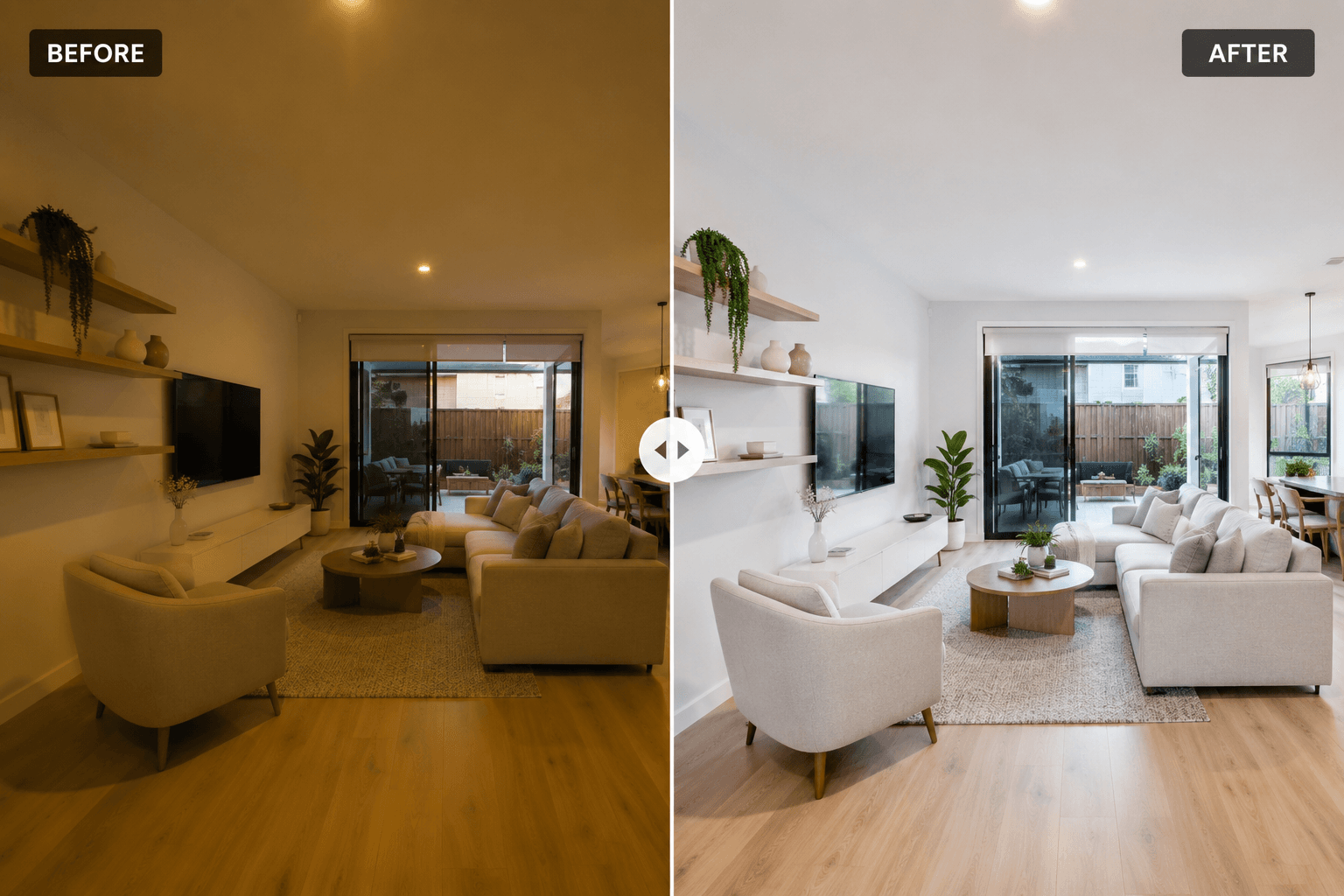
Dark Interiors
Made Bright and Inviting
Interior photography under artificial lighting is notoriously difficult — yellow casts, uneven exposure, and flat contrast are common. Homai's enhancement automatically corrects lighting balance, removes colour casts, and lifts shadow areas to reveal the room's true brightness and size. The result looks like the room was photographed with professional lighting equipment — not like a filter was applied.
- Corrects yellow and green casts from artificial lighting automatically
- Lifts underexposed shadow areas without blowing out bright spots
- Reveals room size and natural light that flat photos obscure
Low-Resolution Photos
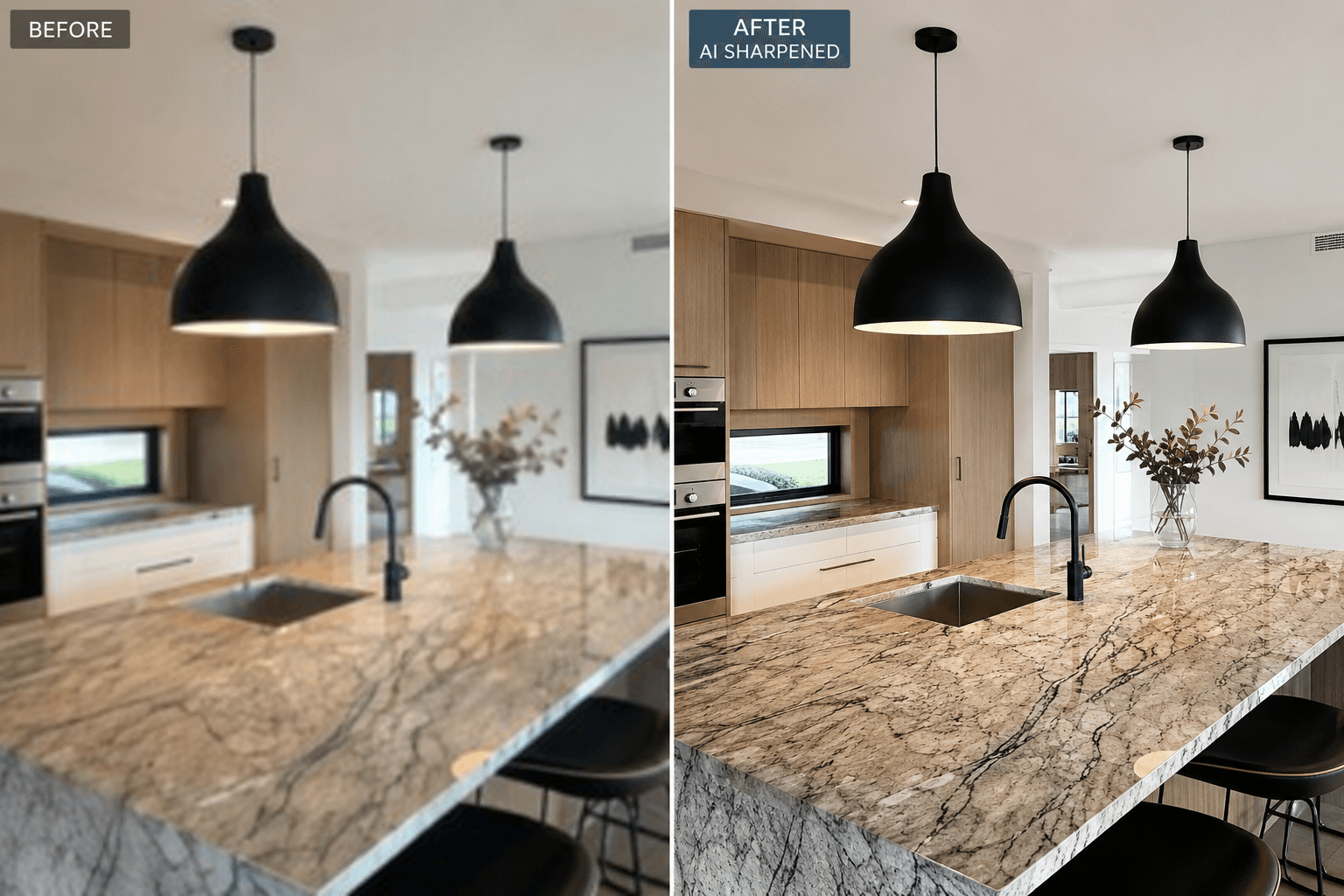
Upscaled to Portal Quality
Phone camera photos, older listing images, and compressed files often fall below the resolution standards of major real estate portals — resulting in blurry thumbnails that look unprofessional. Homai's AI upscaling reconstructs detail at the pixel level, sharpening edges, restoring texture, and producing a high-resolution result from even the most limited source photo.
- AI-powered reconstruction — not simple pixel doubling
- Restores edge sharpness, texture detail, and architectural definition
- Output meets portal resolution standards — ready for immediate upload
AI Photo Enhancement for Every Listing Type
Dark interiors, blurry exteriors, outdated rental photos — explore the full Homai toolkit to get every listing photo looking its best.
Frequently Asked
Questions
Yes — phone camera photos are exactly the kind of image this tool is optimised for. Low resolution, variable lighting, and common colour casts from phone cameras are all addressed in the enhancement pass. The result is a noticeably sharper, better-lit photo ready for portal upload.
No. The AI is calibrated for natural improvement — not dramatic filtering. The goal is to make the photo look like it was taken in better conditions, not like it's been heavily edited. Lighting, colour, and sharpness improvements are applied subtly to maintain a realistic result.
Yes — the enhancement tool works on both interior and exterior photos. For exteriors, it's particularly useful for improving overcast or flat-lit shots, correcting white balance in bright sun, and upscaling older or lower-resolution exterior photos.
Enhance Photo improves the overall quality of the image — lighting, colour, resolution, and sharpness. Sky Cleanup specifically replaces an overcast or blown-out sky with a clear or golden-hour alternative. They're complementary: you can enhance a photo first, then apply sky cleanup for the best result.
Typically a few seconds per photo from upload to download, depending on the original file size.
Explore all Homai AI tools
Every tool works on your existing listing photos — no new photography required.
Four simple steps to stage, redesign,
or transform any property
Upload any property photo and get a professional staging, redesign, or marketing result in under 60 seconds.
Upload your photo
Any room, exterior, floor plan, or sketch — JPG, PNG, or WEBP. Works with existing listing photography or smartphone shots.
- Works on rooms, exteriors, floor plans, and design sketches
- No special equipment — phone camera quality is fine
💡 For best results: well-lit spaces with a straight-on camera angle. Avoid heavy shadows or fish-eye lenses.

Choose your style or settings
Select your design style, tone, or output preferences. Each tool has its own options — staging style, colour, dusk intensity, or copy tone.
- 37+ staging and design styles available across tools
- Settings are tailored to each tool's specific output type

AI generates your result
The AI processes your input and delivers a high-resolution result in under 60 seconds. No manual editing or design experience required.
- Results in under 60 seconds — faster than any manual process
- High-resolution output — no editing or touch-up required

Download and use immediately
Your result is ready to download at full resolution. Publish directly to property portals, social media, client presentations, or print collateral.
- Full-resolution download — portal and print ready
- Use across listings, social media, brochures, and client presentations
