Virtual Home Staging for Real Estate Listings
AI virtual home staging for real estate listings. Turn empty rooms into listing-ready staged photos in minutes — built for consistent results across every property you take on.
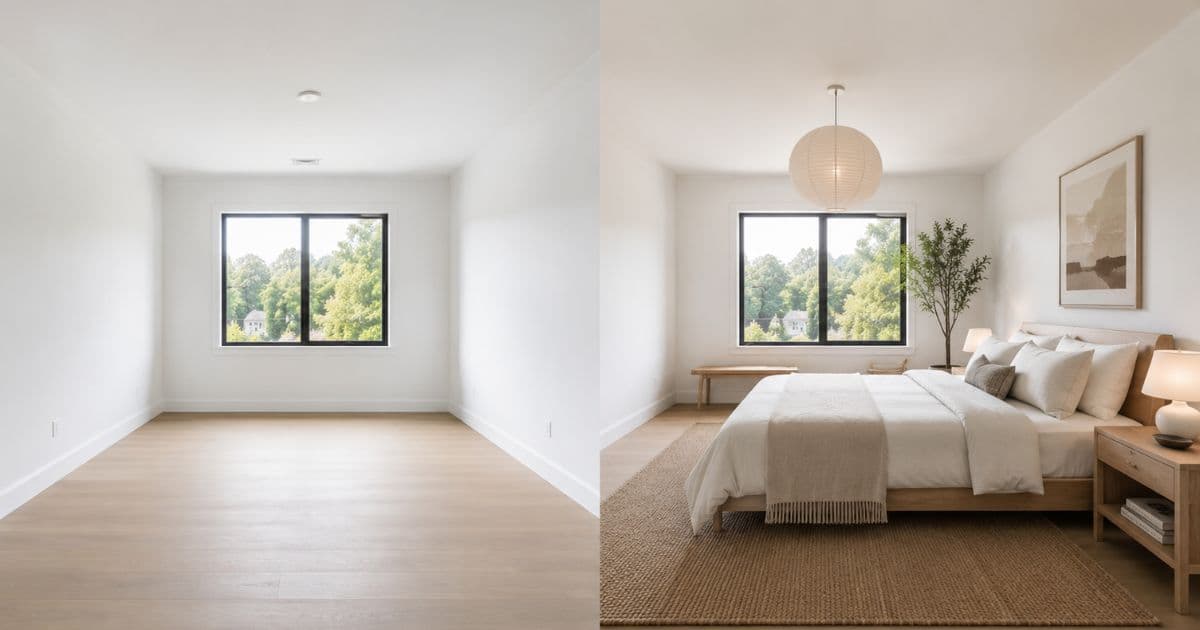
Virtual home staging has become the standard approach for listing photography in competitive real estate markets. 87% of buyers say photos are the most important feature of a property listing (NAR, 2024) — and empty rooms consistently underperform staged ones on every metric that drives listings: views, click-throughs, enquiries, and final sale price.
Homai's AI virtual home staging tool is built specifically for real estate listing production: consistent output across every room type, fast turnaround that fits campaign timelines, and results that are indistinguishable from physically staged rooms in listing photos.
What Virtual Home Staging Is
AI that understands the geometry of your specific room — not a template applied to a generic space.
Virtual home staging is the process of digitally furnishing and styling empty or lightly furnished rooms for real estate listing photography. AI analyses the room's perspective, geometry, and light from a single photograph, then places photorealistic furniture at accurate scale and shadow matching to that specific room.
The result: a fully furnished, listing-ready photo in under 60 seconds.
What Homai's AI preserves in every staged image: walls, floors, ceilings, windows, doors, and all permanent architectural features. Nothing that can't physically be added to the room is changed. Every staged image accurately represents the physical property — which is the compliance requirement on all major listing portals.
What the AI adds: furniture, rugs, lighting fixtures, art, accessories, and styling appropriate to the selected design preset and room type.
Virtual Home Staging by Room Type
Every room in a residential property stages differently — and each one carries different weight in buyer decision-making.
Living Rooms and Open-Plan Living
The most important room in any listing — and the one where staging has the highest impact.
The living room is where buyers form their primary emotional response to a property. An empty living room offers no scale reference, no warmth, and no emotional connection. A staged living room shows buyers exactly how the space functions and whether their life fits inside it.
Homai's AI adds: sofa arrangement calibrated to room dimensions, coffee table, rug anchoring the furniture group, accent chairs, lighting fixtures, art, plants, and accessories. For open-plan spaces, clear zone definition between living and dining areas is generated automatically.
Bedrooms
Master bedrooms staged well demonstrate scale. Secondary bedrooms staged with purpose justify their square footage.
Master bedrooms: hotel-quality bed arrangement, symmetrical bedside setup, layered lighting, rug extending beyond the bed. The AI generates staging at correct scale for the room's actual dimensions — the most common physical staging mistake (furniture too small for the room) doesn't occur.
Secondary bedrooms and spare rooms: these are the rooms that most benefit from purpose-staging. A room staged as a home office reads more clearly and more valuably to buyers than a bare room with ambiguous function. Homai can generate the same room in two staging directions — bedroom and home office — so agents can publish the version that performs best for the specific listing.
Kitchens
Buyers spend more time evaluating the kitchen than any other room. Empty kitchens don't help them.
Kitchen staging adds: countertop styling (plants, cutting boards, fruit bowl, cookbooks), pendant lighting over island benches, bar stools, window accessories, and any appropriate dining zone elements in an adjacent space.
What the AI never changes in a kitchen: cabinet faces, benchtop material, flooring, appliances, or any permanent fixture. The staged image always shows the actual kitchen — styled, not altered.
Dining Areas
Open-plan dining zones need staging to define the space within the larger room.
A staging dining area helps buyers understand how the open-plan flows and how the square footage is distributed between functions. Homai stages dining zones with table, chairs, pendant lighting, and appropriate accessories — calibrated to the physical dimensions of the space.
Home Offices
Post-2020, a spare room staged as a home office is more valuable than an empty one.
A bare room with no staging communicates ambiguity. A room staged as a simple, functional home office — desk, quality chair, shelving, lighting — communicates clear value to buyers who work from home. This segment has grown substantially and consistently responds to home office staging.
Outdoor Areas
Homai's Outdoor Living tool extends virtual staging to exterior spaces — adding photorealistic deck furniture, outdoor dining settings, pool areas, and garden styling to exterior photos.
Why Consistency Across Rooms Matters
A staging scheme that's inconsistent across rooms lowers perceived property quality.
A listing where the living room is staged in Contemporary Modern and the master bedroom is staged in Farmhouse reads as incoherent. Buyers notice it even when they can't articulate why — the property feels like it lacks a design identity.
Homai's batch job feature solves this: upload all rooms at once, select one staging style, and every room is staged consistently in a single job. The listing reads as a cohesive, well-presented property — not a collection of individual rooms.
Getting the Best Results
Five inputs that consistently improve output quality.
Use well-lit photos. Natural light produces the most realistic furniture placement. Shoot in the morning with blinds open where possible.
Level horizons. Shoot straight-on from chest height. Avoid steep angles or tilted cameras.
Prefer empty rooms. Less existing clutter means cleaner furniture placement by the AI. Use Remove & Replace Furniture for occupied properties.
Generate 2–4 variations per key room. Always compare multiple layouts before uploading to portals — especially for the living room and master bedroom.
Use batch mode. Stage the entire listing in one job. Consistent style, consistent quality, consistent marketing package.
Virtual Home Staging vs Physical Home Staging
| Physical Home Staging | Homai Virtual Staging | |
|---|---|---|
| Cost per room | $400–$1,000 | From ~$0.67 |
| Turnaround | 3–5 days | Under 60 seconds |
| Campaign timeline fit | Slow | Fast |
| Listing photo quality | High | Comparable |
| Open inspection | Physical furniture present | Empty rooms |
| Batch processing | Impossible | All rooms simultaneously |
For most listings, virtual staging for portal photos combined with decluttering and a few well-placed physical items for open inspections delivers the best outcome at the lowest cost.
Compliance
AI-staged images should be disclosed as virtual or digitally staged in all advertising. Homai includes a disclosure reminder on every staged result and auto-embeds AI disclosure metadata on every processed image.
Always follow your agency compliance process and the requirements of your local listing portals.
Frequently Asked Questions
Does virtual home staging work for occupied properties?
Yes. Homai's Remove & Replace Furniture tool removes existing furniture from room photos and restages with AI-generated pieces — no physical work required on site.
How many rooms can I stage at once?
Unlimited — Homai's batch mode stages all rooms in a property simultaneously. A 5-room listing is fully staged in under 5 minutes.
What resolution does Homai produce?
4K at 4096×2731 — print-ready for brochures, signboards, and all digital portal uses.
Are the staged images accurate to the physical property?
Yes. Homai's non-destructive output preserves all permanent architectural features. The staged image always accurately represents the physical property.
Does Homai stage outdoor areas?
Yes — Outdoor Living, Landscaping, Day to Dusk, and Exterior Redesign tools cover outdoor and exterior staging and enhancement.
What does virtual home staging cost with Homai?
From ~$0.67 per room on the Starter plan. See the virtual staging pricing guide for a full breakdown.
Listing-Ready Staged Photos for Every Room in Your Property
Upload room photos. Choose a style. Download listing-ready staged images in minutes. Free to start — no credit card required.
Start virtual home staging free → homaihq.com
Related: Virtual Staging for Real Estate | Kitchen Home Staging | House Staging Service
Written by Homai
AI staging and interior design for real estate agents
Related articles
Virtual Staging for Real Estate
A practical guide to virtual staging for agents and fast campaign timelines.
Kitchen Home Staging
AI kitchen staging for listing photos — style any kitchen in 60 seconds.
House Staging Service
AI house staging service — listing-ready photos without furniture hire.
Try Homai
Stage your next listing today
Start with one room photo and get a listing-ready staged image in minutes. Free virtual home staging on signup — no credit card required.