How to Replace a Sky in Real Estate Photos with AI
Overcast skies kill listing click-through rates. Here's how AI sky replacement works, when to use it, and how Homai's Sky Cleanup tool replaces any grey sky in seconds — no editing software required.
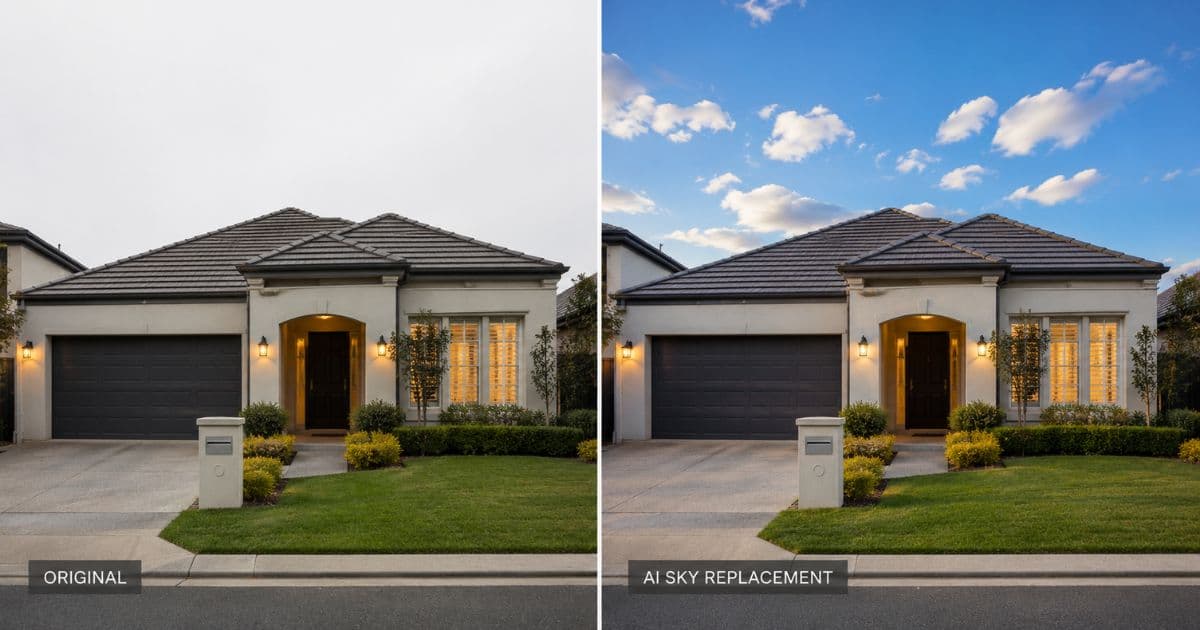
Overcast skies are the most common reason a good exterior photo underperforms. The property, the landscaping, the facade — all professionally photographed. But a flat grey sky drains every bit of warmth and appeal from the image. Buyers scroll past.
AI sky replacement fixes this in seconds. Upload any exterior photo. Homai's Sky Cleanup tool detects the sky region and replaces it with a photorealistic clear blue or golden-hour sky — with accurate integration into the roofline, tree line, and architectural edges.
Why Overcast Skies Hurt Listing Performance
Buyers associate grey skies with grey properties — even when the sky has nothing to do with the home.
It's an irrational but consistent response. Environmental psychology research shows that images with bright, clear skies generate stronger positive emotional responses than identical images with overcast skies. In listing photography, that response translates directly to click-through rate.
Properties in markets with frequent overcast conditions — the UK, Pacific Northwest, coastal Australia — face this problem on almost every listing. Scheduling a reshoot for a clear-sky day costs time and money. AI sky replacement costs under a dollar and takes seconds.
What Bad Skies Do to Listing Photos
| Sky Condition | Effect on Listing Photo |
|---|---|
| Grey overcast | Flat light, no depth, property looks cold |
| Blown-out white sky | Creates harsh contrast, distracts from property |
| Hazy or smoggy | Property looks dated, less premium |
| Clear blue sky | Depth, warmth, bright — property looks its best |
| Golden hour sky | Maximum warmth and appeal |
How AI Sky Replacement Works
Not a copy-paste of a stock sky photo — a contextually accurate replacement that matches the light conditions in the original image.
When you upload a photo to Homai's Sky Cleanup tool, the AI does three things simultaneously:
1. Sky detection. The model identifies the sky region in the photograph with pixel-level accuracy — including complex edges like tree canopies, chimneys, and architectural details. This is the step that separates AI tools from manual Photoshop work, where selecting a complex roofline with trees took significant skill and time.
2. Replacement selection. Based on the implied sun position and time of day in the original photo, the AI selects or generates a sky replacement that matches the ambient light direction. A photo with shadows falling left gets a sky with light implied from the right.
3. Edge blending. The new sky is blended at the boundary with the existing photo — handling semi-transparent elements like tree branches and wispy architectural details with sub-pixel accuracy.
The result is a replaced sky that looks photographed — not composited.
When to Use Sky Cleanup
Overcast Days After Photography
The most common use case. The photographer shoots in flat overcast light — the best available day for the campaign — and the exterior comes back looking dull. Sky Cleanup replaces the grey with clear blue in seconds.
Blown-Out White Skies
In high-contrast outdoor shooting conditions, the sky often "blows out" to pure white while the property exposes correctly. A blown-out white sky creates harsh contrast and distracts from the property. Sky Cleanup replaces it with a natural sky gradient.
Consistency Across Multiple Listing Photos
A listing with 8 exterior photos shot across two days often has inconsistent sky conditions. Sky Cleanup normalises the sky across all images — consistent blue sky throughout the listing gives a more polished, professional impression.
Before Day to Dusk Conversion
Homai's Day to Dusk tool works best on photos with a clean sky region. Running Sky Cleanup first — replacing a heavily overcast sky with a clean blue sky — produces better day-to-dusk results, because the AI has a clean canvas to apply the twilight gradient to.
Sky Cleanup vs Manual Sky Replacement
| Manual Photoshop | AI Sky Cleanup (Homai) | |
|---|---|---|
| Time per image | 15–45 minutes | Seconds |
| Skill required | High | None |
| Edge quality | Depends on skill | Consistent, pixel-accurate |
| Cost | $10–$30 per image outsourced | Included in Homai plan |
| Batch processing | One at a time | Multiple images simultaneously |
How to Use Homai's Sky Cleanup Tool
Step 1: Photograph the property on any day — overcast, flat, or bright. JPG, PNG, or WEBP.
Step 2: Open your Homai dashboard at homaihq.com and select Sky Cleanup.
Step 3: Upload the exterior photo. The AI processes in seconds.
Step 4: Download the result. The replaced sky is accurate to the light conditions of the original photo.
Pair it with:
- Day to Dusk — convert the cleaned-up exterior to a twilight shot (+66% more listing views)
- Exterior Redesign — change facade colors on the cleaned-up exterior
- Landscaping — add or improve gardens alongside the enhanced sky
- Enhance Photo — upscale resolution and improve overall lighting
The workflow tip: For the hero exterior shot on any listing, run Sky Cleanup first, then Day to Dusk. The combination produces the most impactful possible listing exterior image — consistently better than either tool used alone.
Compliance for AI Sky Replacement
Sky replacement is accepted on all major listing portals globally — Zillow, Rightmove, Domain, REA — and is considered standard practice in professional real estate photography.
Requirements vary by market, but the consistent guidance is:
- The sky replacement must not alter the property's architecture or permanent features
- Labelling enhanced images as "Digitally Enhanced" in photo captions is recommended in most markets
- The physical property must match what the listing photos show in all permanent aspects
Homai's Sky Cleanup preserves the entire property — only the sky region is changed. AI disclosure metadata is embedded automatically on every processed image.
Frequently Asked Questions
Does AI sky replacement look natural?
Yes. Homai's Sky Cleanup produces photorealistic results that match the ambient light conditions of the original photo — the replacement looks photographed, not composited.
Can it handle complex edges like trees and chimneys?
Yes. The AI handles semi-transparent edges, complex rooflines, tree canopies, and architectural details with pixel-level accuracy.
What resolution does Homai produce?
4K at 4096×2731 — print-ready for brochures, signboards, and all digital uses.
Do I need to disclose AI sky replacement?
Labelling as "Digitally Enhanced" is recommended in most markets. Homai embeds AI disclosure metadata automatically on every processed image.
Can I batch-process multiple exterior photos?
Yes — Homai processes multiple images. Use batch mode for listings with several exterior angles.
Does Sky Cleanup work before Day to Dusk?
Yes — and it's the recommended workflow. Sky Cleanup first, then Day to Dusk produces the best twilight results.
Clear Skies on Every Listing Photo — In Seconds
Homai's Sky Cleanup replaces any overcast or blown-out sky with a photorealistic clear blue sky. No editing software, no manual selection, no outsourcing.
Try Sky Cleanup free → homaihq.com
Related: Day to Dusk Real Estate Photography | AI Real Estate Photo Editing | House Staging Service
Written by Homai
AI staging and interior design for real estate agents