Why Your Listing Photos Are the Reason Your Property Isn't Selling
Most agents blame the market when a listing underperforms. The data says look at the photos first. Here's what bad listing photography actually costs — and what to do about it.
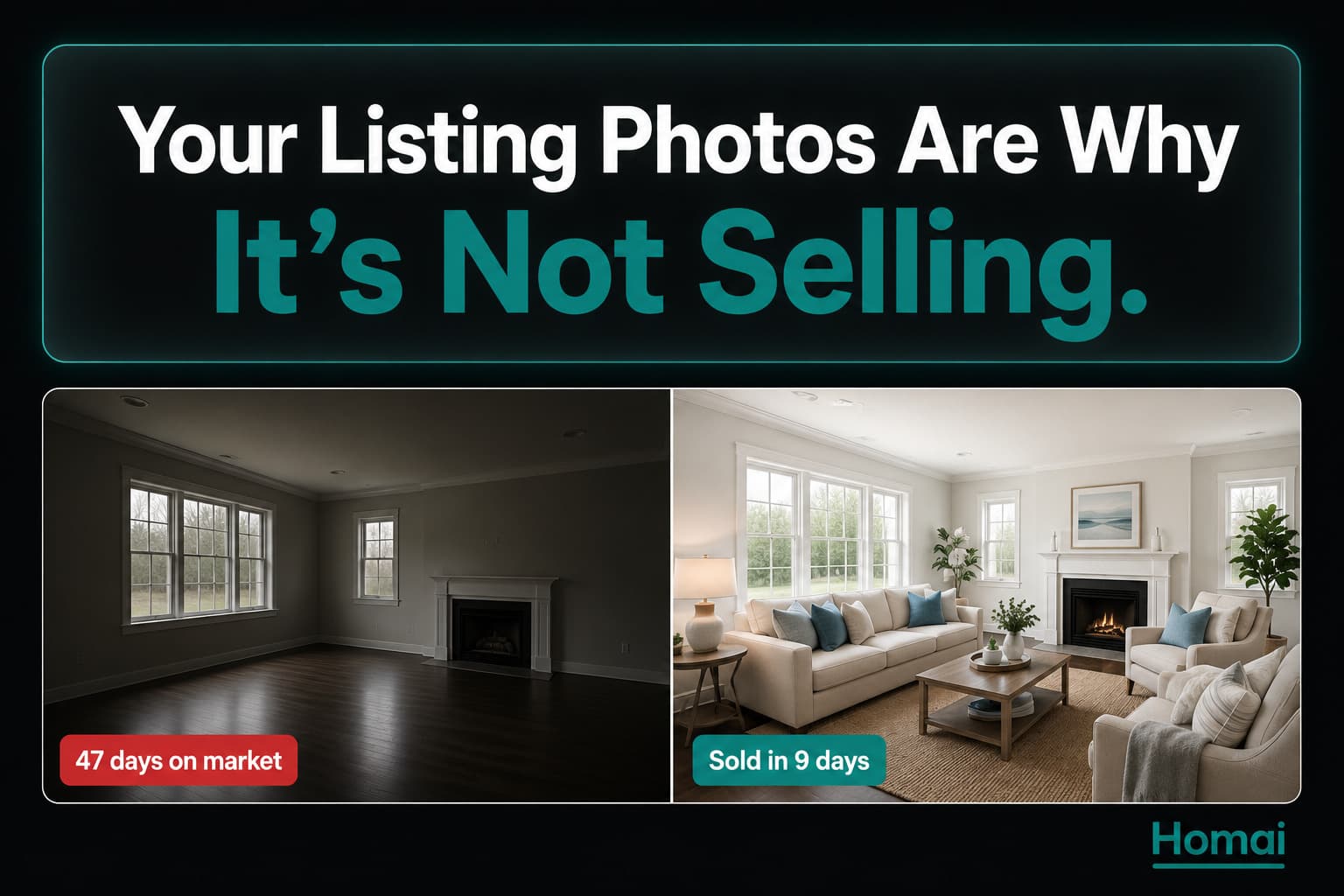
When a listing sits on the market for 60 days without selling, the agent usually says: "It's the market." The vendor says: "We're priced correctly." Nobody says: "The photos are the problem."
But often, the photos are the problem.
Listings with professional-quality photography sell 32% faster and for 1–3% more than comparable listings with standard photos (Redfin, 2024). In a $700,000 property, that's $7,000–$21,000 in lost value — before you account for the holding costs of an extra 30 days on market.
This is the part of the listing that agents control completely. No market conditions, no vendor expectations, no timing factors. Just: do the photos look good enough for buyers to click through and enquire?
Here is an honest look at what's actually in your listing photos that's costing you sales.
The Portal Is a Scrolling Billboard and You Have 3 Seconds
Buyers make a click-through decision in under 3 seconds. Your cover photo is either making that decision for them, or against them.
On Zillow, Domain, REA, and Rightmove, buyers scroll through listing thumbnails at speed. Eye-tracking research consistently shows that buyers spend an average of 2–3 seconds evaluating a listing thumbnail before deciding to click through or keep scrolling.
In those 2–3 seconds, buyers are not reading your headline, not checking the number of bedrooms, and not reading the price. They're responding to a single visual impression: does this property feel worth my time?
That impression is almost entirely determined by one photograph — the cover image. Everything else in your listing is secondary to getting a buyer through the door of clicking that thumbnail.
| Cover Photo Quality | Estimated Click-Through Effect |
|---|---|
| Professional, well-lit, staged | Baseline |
| Dark or poorly lit | -40 to -60% click-through |
| Empty room, no furniture | -30 to -50% click-through |
| Cluttered or personal items visible | -35 to -55% click-through |
| Tilted or distorted perspective | -20 to -40% click-through |
These aren't exact numbers — click-through varies by market, price point, and competition. But the directional impact is consistent across every study of real estate portal behaviour.
💡 The Takeaway: A bad cover photo doesn't just slow down a sale. It prevents a significant portion of your potential buyer pool from ever clicking through to see the property at all.
The 6 Photo Problems That Kill Listing Performance
These are the most common photo issues in listing galleries — and most of them are entirely preventable.
Problem 1: Dark Photos
Dark listing photos — shot in poor light with no artificial lighting — look uninhabitable. Buyers' unconscious response to dark rooms is "this feels damp/small/sad." The room may be perfectly sized and well-maintained; a bad photo communicates none of that.
Fix: Shoot with all lights on AND natural light from windows. If the room has insufficient light, an on-camera flash or a single speedlite on the ceiling will transform the output. For photos already taken in dark conditions, Homai's Enhance Photo tool automatically adjusts exposure, contrast, and colour balance.
Problem 2: Vacant Rooms with No Furniture
An empty room tells buyers nothing about scale, function, or livability. A living room with no furniture reads as "small, hard to picture." The same room with AI-staged furniture reads as "this is where I'd spend my evenings."
Fix: Homai's Virtual Staging adds photorealistic furniture to any empty room in ~45 seconds at a cost of under $2. There is no justification for publishing vacant room photos to a listing portal in 2026.
Problem 3: Cluttered or Personal Items Visible
A listing photo with:
- Family photos on the wall
- Children's artwork on the fridge
- Personal toiletries on the vanity
- Laundry visible through a doorway
...communicates to buyers that this is someone else's home, not their potential home. The psychological barrier is real — buyers find it harder to picture themselves living somewhere when it's visibly saturated with someone else's life.
Fix: Pre-shoot preparation checklist (see below). Homai's Erase Objects tool removes items that should have been moved before shooting but weren't.
Problem 4: Outdoor Photos on Overcast Days
An exterior photo under a grey sky makes even a beautiful home look dull. In many markets, the facade photo is the cover image — and a greyed-out sky makes the first impression flat.
Fix: Homai's Sky Cleanup tool replaces overcast skies with clear blue skies automatically. Homai's Day to Dusk tool converts a daytime exterior to a warm twilight shot — which generates 66% more portal views than a daytime equivalent (PhotoUp, 2025).
Problem 5: Poor Camera Angle
The two most common bad angles:
- Eye level from a doorway — this crops out much of the room and makes every room look smaller than it is
- Very low angle — creates a dramatic effect that distorts proportions
The correct angle for listing photography: from a corner of the room, at chest height (approximately 1.0–1.2m). This is the angle that captures the most of the room while maintaining natural proportions.
Problem 6: Not Enough Photos
The standard for listing photography has increased significantly. Buyers expect:
- 15–25 photos minimum for a 3-bedroom property
- Every room photographed
- At least 2 exterior angles
- An outdoor/alfresco area if present
Listings with fewer than 10 photos generate fewer enquiries than listings with 20+, even when the photos that do exist are high quality. Buyers interpret low photo counts as hiding something.
The Vacant Room Problem — And Its $0.60 Solution
The single most common and most impactful listing photo problem in 2026 is still vacant rooms. The fix costs less than a coffee.
We know from data (see: We Staged 10,000 Rooms with AI: Here's What We Learned) that listing performance is significantly higher for staged listings versus unstaged ones. We also know that AI staging costs under $2 per room with Homai — a Starter plan at $49/month covers 40 rooms, which is approximately $1.23 per staging.
The cost of leaving a room vacant in a listing gallery is not $0. It's the difference between a buyer clicking through to enquire and a buyer scrolling past to the next listing. In a market with limited stock, that missed click-through may be the difference between a sale and 90 days on market.
The maths are simple:
- Cost of staging 6 rooms with Homai: ~$7–$12
- Cost of 30 additional days on market (holding costs for vendor, lost commission days for agent): thousands
There is no agent in any market for whom the economics of AI staging don't work.
The "But It Photographs Small" Problem
"The room is actually bigger than it looks in the photos" is something buyers should never have to say.
If you hear this regularly from buyers at open homes, the photography is doing your property a disservice. Small-looking rooms in photos are caused by:
Wrong lens choice. A standard lens (50mm equivalent) on an interior makes rooms look smaller. A wide-angle lens (16–24mm equivalent) is the standard for interior real estate photography because it captures more of the room while maintaining natural proportions.
Wrong camera position. Shooting from the middle of a wall makes a room look half its size. Shooting from the corner of the room — diagonally across — captures both walls and the full ceiling, communicating volume.
No vertical space. A photo that doesn't include the ceiling removes one of the most important spatial signals buyers use to assess room size. Include the ceiling, especially in rooms with high ceilings that are a selling point.
AI staging that places oversized furniture. Poorly calibrated AI staging tools sometimes place furniture that's too large for the room's actual proportions. Homai's non-destructive staging model uses the room's actual geometry to scale furniture correctly.
What Good Listing Photos Actually Look Like
These are the characteristics of listing photos that generate click-through and enquiry consistently.
The cover photo:
- Shows the property's strongest room or exterior feature
- Well-lit (naturally and artificially)
- Staged with furniture (AI staging is acceptable and standard)
- Shot from the optimal angle for that room type
- For exterior covers: clear sky, driveway clear of vehicles, good presentation
The gallery sequence:
- Opens with the hero room (usually living area)
- Follows the natural flow a buyer would walk through the property
- Includes every room
- Uses consistent staging style throughout
- Ends with outdoor and street-view shots
Individual photo quality:
- Exposure correct (no blown-out windows, no underexposed shadows)
- Straight horizontal lines (not tilted)
- Wide-angle perspective without distortion
- All surfaces clean and clutter-free
The Agent Checklist: Before Your Next Photo Shoot
Print this. Share it with your vendor. Go through it the day before shooting.
Interior — every room:
- All lights working and on (replace blown globes)
- All blinds/curtains open
- All personal photos removed
- All power cables hidden
- All surfaces cleared to 3 items maximum
- Floor completely clear
- Bed made hotel-quality
- Bathroom: all toiletries removed, clean white towels folded
Kitchen specifically:
- Benchtops clear except 3–4 styled items
- Sink clean and dry
- Fridge clear of all magnets and notes
- Dishcloth and tea towels out of sight
Exterior:
- Driveway clear of all vehicles
- Bins moved out of frame
- Lawn mowed, edges trimmed
- Front path swept
- Any peeling paint or visible maintenance issues noted (for AI editing or scheduling)
After the shoot:
- Upload to Homai for AI enhancement
- Day to Dusk conversion on the best exterior shot
- Sky Cleanup if shot on overcast day
- Virtual Staging on any vacant rooms
- Verify disclosure text is in the listing for any AI-staged images
Frequently Asked Questions
How much do bad listing photos actually cost?
The data suggests staged properties sell 32% faster and for 1–3% more than unstaged equivalents. For a $700,000 property, that's $7,000–$21,000 in lost value before holding cost considerations.
Can I fix bad listing photos after they're taken?
Yes — Homai's tools (Enhance Photo, Sky Cleanup, Day to Dusk, Erase Objects, Virtual Staging) can correct most common photography problems without reshooting. Some problems (wrong angle, too dark with no light sources at all) benefit from a reshoot.
Should I reshoot or edit AI enhance bad photos?
AI enhancement works well for lighting, colour, sky, and object removal. Reshoot if: the angle is fundamentally wrong (doorway instead of corner), the room was photographed with all lights off, or there's significant distortion.
Is AI staging disclosure mandatory?
In most markets, yes — staged photos must be labelled "Virtually Staged" in captions and/or the listing description. Check your local real estate advertising standards.
Related: Day to Dusk Real Estate Photography: How AI Replaces the $500 Twilight Shoot | Curb Appeal Ideas: 25 Ways to Transform Your Home's Exterior | What Buyers Look for in Listing Photos (And How to Give It to Them)
Written by Homai
AI staging and interior design for real estate agents