Homai vs ApplyDesign: Which AI Staging Tool Is Better in 2026?
A direct comparison of Homai and ApplyDesign across output quality, pricing, features, and real estate listing suitability. Honest verdict for agents choosing between the two.
ApplyDesign has built a focused virtual staging product with solid adoption among real estate professionals — ~10K monthly visitors, DR 47, and a growing reputation in the US and UK markets.
Homai's positioning is different: a complete listing production platform where staging is the core but not the only function. This comparison covers both tools across the criteria that matter for real estate listing production.
Background: Who Each Tool Is Built For
Understanding the design intent behind each tool clarifies why they differ.
ApplyDesign positions itself as a professional-grade virtual staging platform for real estate agents and home staging professionals. Its focus is tight: high-quality AI staging output for listing photos, with a clean, professional interface. The tool does one job and does it well.
Homai is built around the complete listing production workflow — staging is the entry point, but the platform extends to photo enhancement, exterior redesign, video generation, and AI marketing copy. The design premise is that an agent shouldn't need five separate tools to produce a complete listing campaign.
This difference in scope explains most of the comparisons below.
Output Quality Comparison
Tested on the same three room types with both tools.
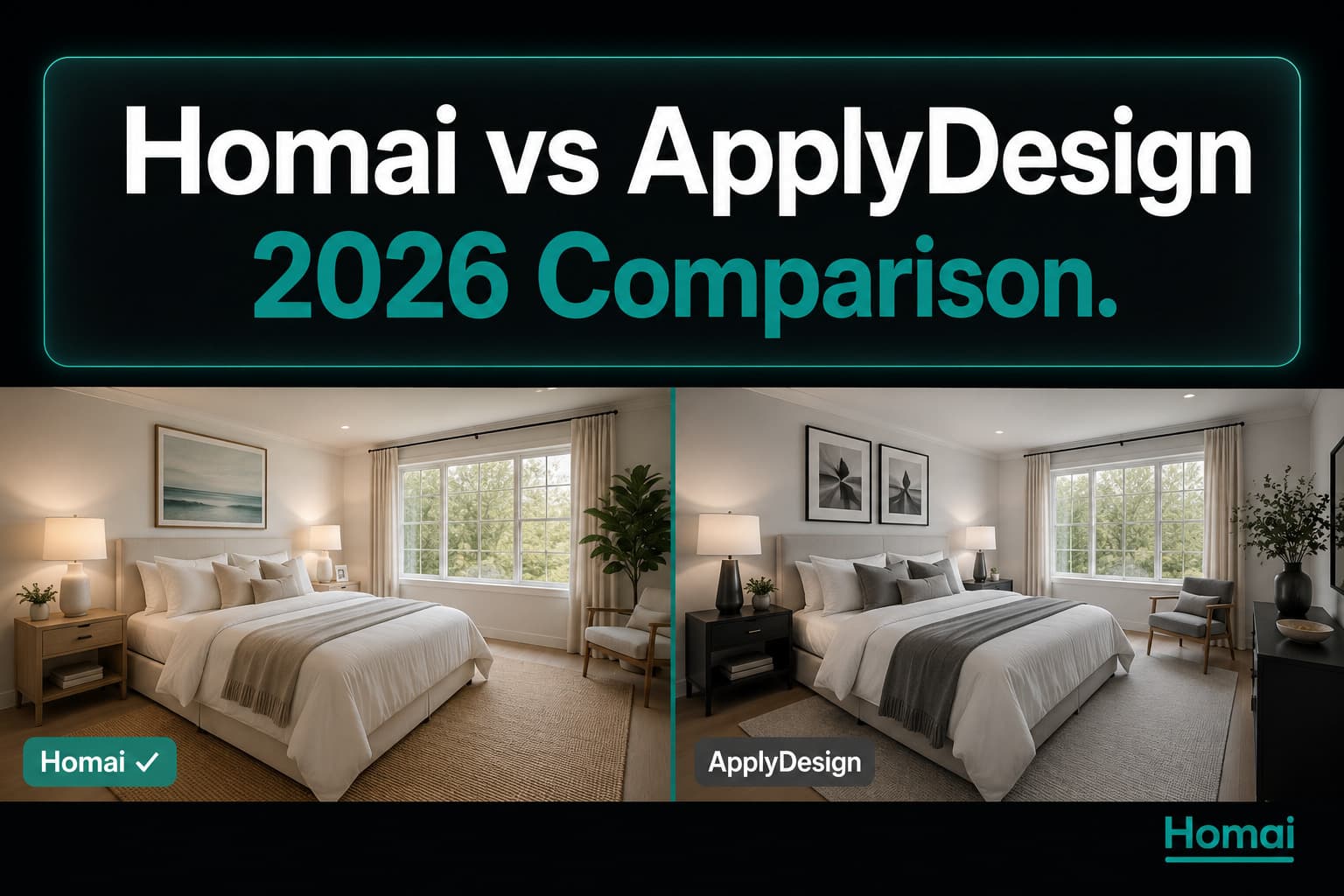
Living Room: Both tools produced photorealistic outputs. ApplyDesign's contemporary preset produced a clean, minimal result with accurate furniture scale. Homai's output had slightly more accessory depth — the staging looked more "finished" with more secondary styling elements. Both would be acceptable for portal publication.
Master Bedroom: ApplyDesign's bedroom output was clean and professional. Homai's output included more layered styling (bedside accessories, varied textile textures) that reads as more aspirational in listing photos.
Open-Plan Kitchen/Dining: Homai maintained clear zone separation between the kitchen and dining areas. ApplyDesign handled the zone division well but produced slightly conservative dining staging.
| Criterion | Homai | ApplyDesign |
|---|---|---|
| Non-destructive output | ✓ Explicit guarantee | ✓ Generally |
| Furniture scale accuracy | ★★★★★ | ★★★★☆ |
| Styling depth | ★★★★★ | ★★★☆☆ |
| Resolution | 4K | ~2400×1600px |
| Generation speed | ~47 sec | ~65 sec |
| Style range | 37 curated | ~12 options |
Feature Comparison Table
| Feature | Homai | ApplyDesign |
|---|---|---|
| AI virtual staging | ✓ | ✓ |
| Style range | 37 | ~12 |
| Batch processing | ✓ Parallel | ✗ Sequential |
| 4K resolution output | ✓ | ✗ (~2400px) |
| Day to Dusk | ✓ | ✗ |
| Sky replacement | ✓ | ✗ |
| Object removal | ✓ | ✗ |
| AI listing copy (8 tools) | ✓ | ✗ |
| Property video (3 types) | ✓ | ✗ |
| Floor plan visualization | ✓ | ✗ |
| Non-destructive guarantee | ✓ Stated | Not explicitly stated |
| Reference image style match | ✓ | ✗ |
ApplyDesign is a virtual staging tool. Homai is a listing production platform. The feature gap is substantial.
Pricing Breakdown
| Homai | ApplyDesign | |
|---|---|---|
| Entry plan | $49/month (40 rooms) | ~$49/month (~20 images) |
| Pro plan | $199/month (150 rooms) | ~$149/month (~80 images) |
| Per room at entry | ~$1.23 | ~$2.45 |
| Per room at pro | ~$1.33 | ~$1.86 |
| Free start | Free staging on signup | Trial available |
At entry pricing, Homai delivers more rooms per dollar. At pro pricing, ApplyDesign is slightly cheaper per image — but that comparison doesn't account for the additional tools (Day to Dusk, video, copy) included in Homai's price that would require separate subscriptions if using ApplyDesign.
The Workflow Difference
This is the practical difference that adds up over a month of listings.
ApplyDesign workflow for a 6-room listing:
- Upload room 1 → wait → download
- Upload room 2 → wait → download
- Repeat × 6
- Total active time: 15–20 minutes
- Then: separate tools for photo enhancement, video, copy
Homai workflow for a 6-room listing:
- Upload all 6 rooms to batch tool
- Generate all simultaneously (2–3 minutes)
- While staging processes: generate listing description, social posts, video
- Total active time: 15–20 minutes
- Output: staged photos + marketing copy + video, all from one platform
Same clock time, but Homai produces a complete listing package where ApplyDesign produces staged photos only.
Where ApplyDesign Has the Edge
Established professional reputation. ApplyDesign has been in market longer and has a documented track record with professional stagers and agents. For buyers who want the "safe" established choice, that track record has weight.
Simpler interface. If all you need is staging — nothing else — ApplyDesign's focused single-function interface is less complicated to navigate than a full production platform.
Where Homai Has the Edge
4K output — required for print brochures and signboards.
Batch processing — all rooms simultaneously, not sequentially.
Complete production suite — staging, enhancement, video, and AI copy from one account.
Style range — 37 curated presets vs ~12 options gives more flexibility for matching buyer demographics.
Per-room economics — better at equivalent volume.
Verdict
For agents who need virtual staging only and value simplicity: ApplyDesign is a capable tool with a professional reputation.
For agents who want a complete listing production platform — staging, photo enhancement, video, and AI copy without managing multiple subscriptions: Homai covers the full workflow at comparable or better per-room pricing.
The comparison isn't really Homai vs ApplyDesign. It's "do you need a staging tool or a listing production platform?" The answer to that question determines which one you need.
Related: Virtual Staging AI: How It Works and Why Real Estate Agents Are Switching | Homai vs ReimagineHome: Which AI Home Design Tool Is Right for You? | I Staged 5 Empty Rooms with 5 Different AI Tools. Here's What Happened. | Homai vs Collov AI: Complete 2026 Comparison
Written by Homai
AI staging and interior design for real estate agents